
Security Policies
HiveMind OS enforces data-classification boundaries so that sensitive information never leaks to under-classified channels. This guide walks through configuring override policies, classification rules, prompt-injection scanning, organisational lockdown, and the audit log.
Classification Rules
Every piece of data carries a label. Every outbound channel (provider, MCP server, webhook) declares what it accepts.
| Level | Tag | Accepts |
|---|---|---|
| 0 | PUBLIC | Safe to send anywhere |
| 1 | INTERNAL | Org-managed cloud endpoints |
| 2 | CONFIDENTIAL | Private / local channels only |
| 3 | RESTRICTED | Never leaves the device |
Labelling providers and MCP servers
Set channel_class on each provider and MCP server:
models:
  providers:
    - id: openai
      channel_class: public        # only receives PUBLIC data

    - id: ollama-local
      channel_class: local-only    # receives all levels

mcp_servers:
  - id: corporate-kb
    channel_class: internal      # PUBLIC + INTERNAL
Data inherits its classification from its source — clipboard from a password manager is RESTRICTED, a public web page is PUBLIC. The knowledge graph propagates the highest ancestor classification to child nodes. You can also manually tag any snippet or node.
Changing a workspace file's classification
You can also set a classification directly from the desktop app:
- Open the Workspace browser for your session
- Right-click a file or folder
- Under Classification, choose
PUBLIC,INTERNAL,CONFIDENTIAL, orRESTRICTED - Use Clear Override if you want to remove the manual setting
This is useful when a file is more sensitive than its path or contents make obvious. Once set, that classification flows with the file content anywhere HiveMind OS uses it. If an agent reads a RESTRICTED document and then tries to pass part of it to a public MCP server, webhook, or connector, the classification gate applies your configured policy (block, prompt, allow, or redact-and-send) before the tool call is allowed to continue.
Configuring Override Policies
When data would cross a classification boundary, the override_policy controls what happens:
security:
  override_policy:
    internal: prompt           # ask before sending
    confidential: prompt
restricted: block # never allow, even with consent| Action | Behaviour |
|---|---|
block | Blocked — user is informed but cannot override |
prompt | User sees the data, source classification, and target channel; can Allow / Deny / Redact |
allow | Automatically permitted (dev/testing only) |
redact-and-send | Strips sensitive tokens with [REDACTED] and sends without prompting |
The Approval UI
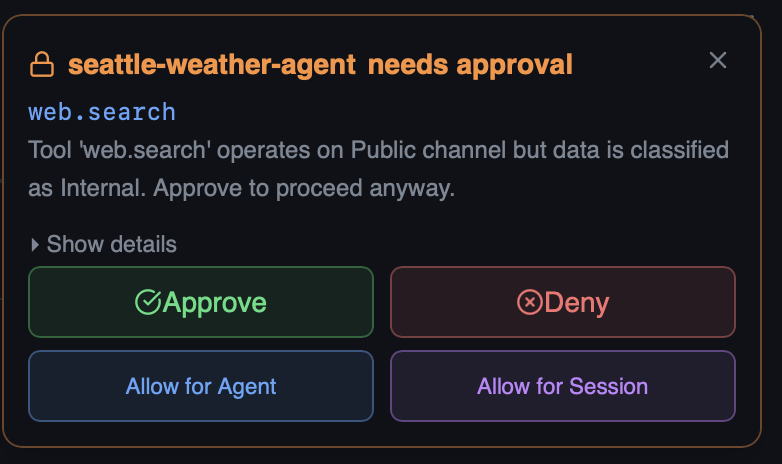
When a bot triggers a prompt policy — for example, calling web.search when the session data is classified as Internal but the tool operates on a Public channel — HiveMind OS pauses the bot and surfaces an approval request.
A toast notification appears so you can respond quickly:
For full details, open the Tool Approval dialog. It shows exactly what the bot wants to do — the tool name, why approval is required, and the exact input parameters:
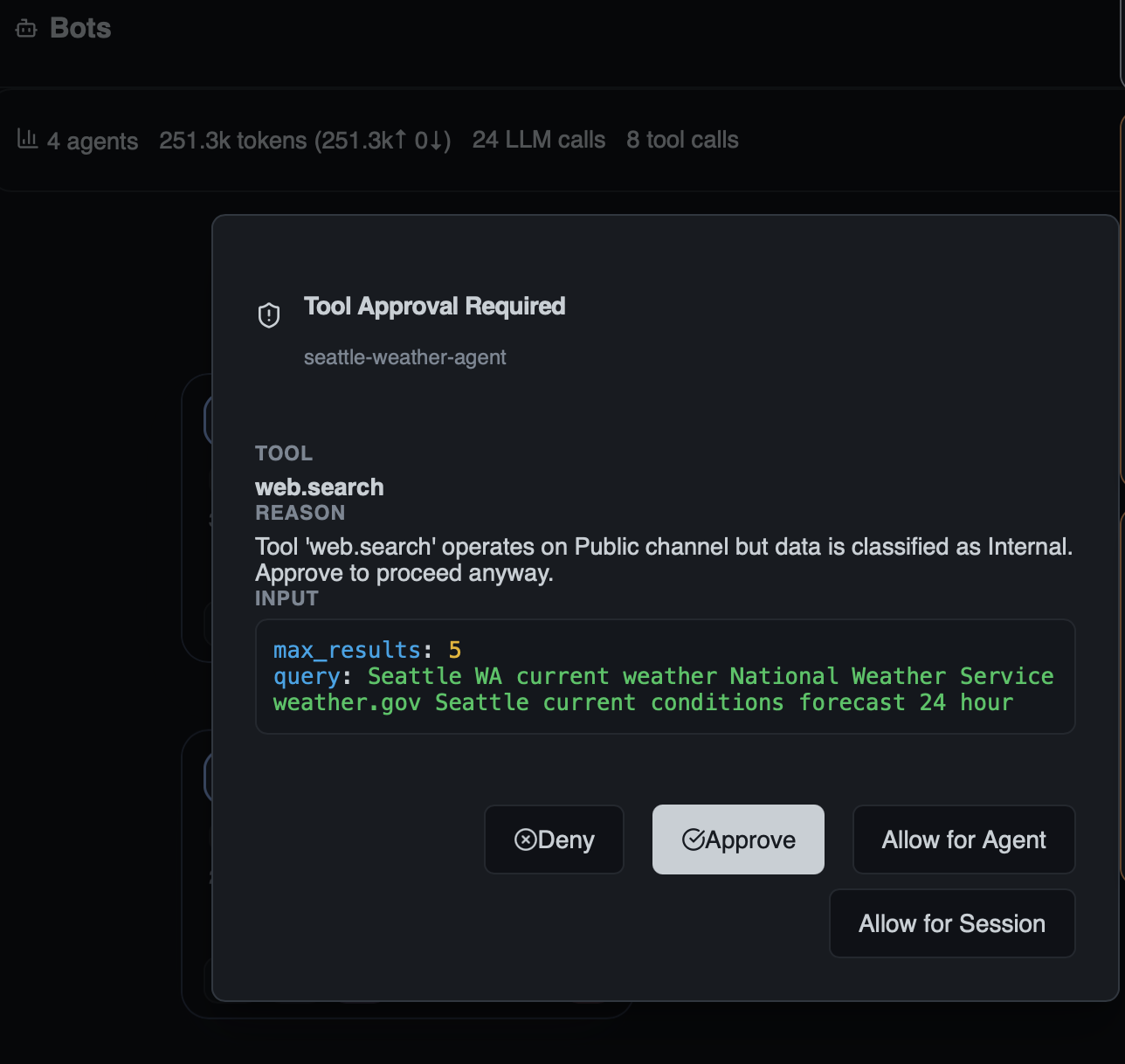
You have four choices:
| Option | Effect |
|---|---|
| Approve | Allow this single tool call to proceed |
| Deny | Block this single tool call |
| Allow for Agent | Auto-approve this tool for the remainder of this bot's lifetime |
| Allow for Session | Auto-approve this tool for all bots in the current session |
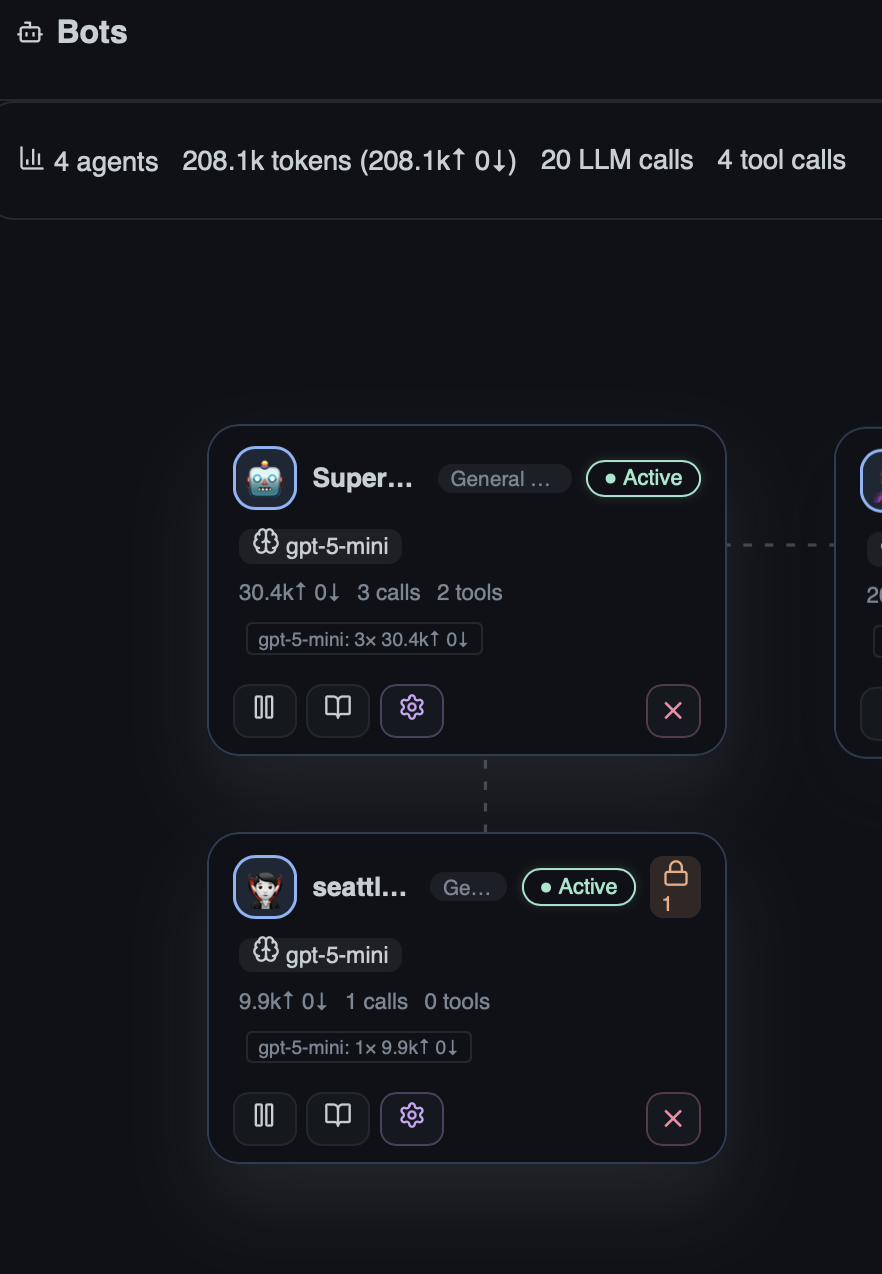
On the Agent Stage, bots awaiting approval display a lock badge with a count of pending requests, making it easy to spot which agents need attention:
WARNING
Never set RESTRICTED to allow in production. Restricted data includes credentials and secrets that must not leave the device.
Prompt Injection Scanning
External data (tool results, MCP responses, web content) can carry adversarial instructions. HiveMind OS runs an isolated scanner model that analyses payloads before they reach the agent loop.
Setup
- Enable model-based scanning — optionally use a fast, cheap, local model:
security:
  prompt_injection:
    enabled: true
    model_scanning_enabled: true
    scanner_models:
      - provider: ollama-local
model: smollm2-360m # fast, stays on-device- Configure scan policies:
security:
  prompt_injection:
    enabled: true
    scan_sources:
      workspace_files: true
      mcp_responses: true
      web_content: true
      messaging_inbound: true
    action_on_detection: prompt    # block | prompt | flag | allow
    confidence_threshold: 0.7
    cache_ttl_secs: 3600
    max_payload_tokens: 4096
batch_small_payloads: true- On detection — depending on
action_on_detection:
| Action | Result |
|---|---|
block | Payload rejected; agent sees "Content blocked by injection scanner" |
prompt | User sees flagged spans and can Allow / Block / Redact |
flag | Content marked as flagged and passed through for audit |
allow | Verdicts recorded for audit only — nothing blocked |
WARNING
The scanner model should be local whenever possible. Sending potentially injected payloads to a cloud provider for scanning defeats the isolation purpose.
Audit Log
Every data-flow decision is recorded in a tamper-evident local log.
- Location:
~/.hivemind/audit.log - What's logged: allowed/blocked/redacted decisions, classification overrides, user justifications, prompt-injection scan verdicts, content hashes, timestamps
- UI: The Audit Log tab provides filtering by type, verdict, source, and date range. The Risk Scans sub-tab shows all security scan results.
Querying the risk scan ledger
-- All blocked injection attempts in the last 24 hours
SELECT source, threat_type, confidence, scanned_at
FROM risk_scans
WHERE scan_type = 'prompt_injection'
  AND verdict = 'detected'
  AND scanned_at >= datetime('now', '-1 day');

-- Top risky sources
SELECT source, COUNT(*) as detections
FROM risk_scans
WHERE verdict != 'clean'
GROUP BY source;
Export query results for compliance by piping from the CLI or using the UI export action.
Example: Block Secrets from Cloud Providers
This policy ensures credentials and API keys never reach any cloud provider:
security:
  override_policy:
    restricted: block                  # secrets are always blocked
    confidential: redact-and-send      # strip sensitive tokens automatically
    internal: allow

  prompt_injection:
    enabled: true
    model_scanning_enabled: true
    scanner_models:
      - provider: ollama-local
        model: smollm2-360m
    scan_sources:
      workspace_files: true
      mcp_responses: true
      web_content: true
    action_on_detection: block

models:
  providers:
    - id: openai
      kind: open-ai-compatible
      channel_class: public
    - id: azure-openai
      kind: open-ai-compatible
      channel_class: internal
    - id: ollama-local
      kind: ollama-local
      channel_class: local-only
With this config, secrets (RESTRICTED) are always blocked from leaving the device, confidential data is automatically redacted before reaching cloud endpoints, and prompt injection payloads are blocked outright.